… and just like that, here we are.
Why This Website?#
A few months ago I decided to leave my corporate job and go fully independent as a contractor, specialising in AWS Cloud Networking, Terraform, and GitOps.
My plan was simple: there must be plenty of companies struggling with hybrid cloud connectivity — surely they need help, right?
Reality check: nothing happened.
I updated my LinkedIn, reached out to recruiters, refreshed my CV, created profiles on specialist platforms… and got almost zero traction.
After talking to AI and a few friends, the message was crystal clear:
“Nobody cares about the cool stuff you did behind corporate walls. You need a portfolio.”
This would basically mean to re-built and re-document everything I did in the last 10 years, which is a bit of a nightmare, but at least I can start with something simple: this website.
So I decided to build one — publicly.
Phase 1: The Quick & Dirty Static Site#
I already had a personal AWS account, so:
- Registered
mplexia.com - Created an S3 bucket
- Uploaded a simple
index.html
(manual clicks, ugh) and pointed the DNS to the bucket.

A quick chat with Grok gave me a decent-looking single-page site + Calendly integration. A few more clicks and the site was live. (single index.html, but hey, it’s a start!)
But manually uploading files via the AWS Console felt painful.
Enter AWS CLI#
Instead of click-ops, I started using the command line:
aws s3 cp index.html s3://mplexia.com/ This was a game-changer. I could update the site with a simple command, no more manual uploads.
Phase 2: Adding Automation (GitOps Style)#
I wanted several things:
- A proper way to manage content
- An option to see previous version of the site (version control)
- Ability to work from any computer
- Full automation (no more manual uploads)
So I added:
- GitHub as the source of truth
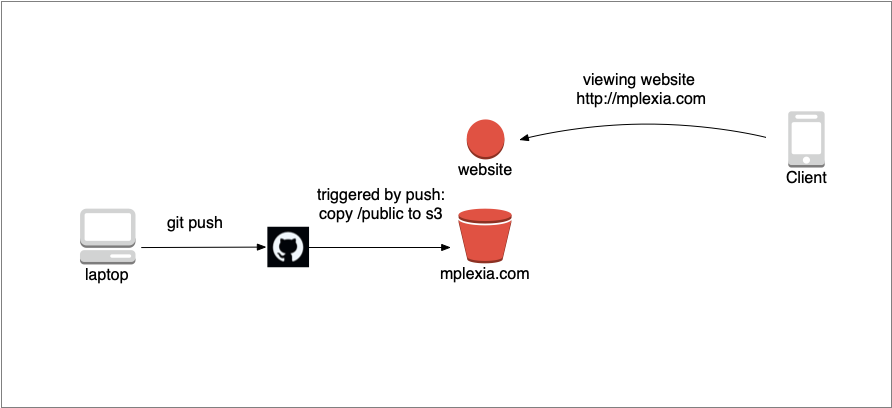
- GitHub Actions to automatically deploy to S3 on every git push
Here’s the workflow:
name: Deploy to S3

on:
  push:
    branches: [ main ]
  workflow_dispatch:

jobs:
  deploy:
    runs-on: ubuntu-latest
    steps:
      - uses: actions/checkout@v4

      - name: Configure AWS Credentials
        uses: aws-actions/configure-aws-credentials@v4
        with:
          aws-access-key-id: ${{ secrets.AWS_ACCESS_KEY_ID }}
          aws-secret-access-key: ${{ secrets.AWS_SECRET_ACCESS_KEY }}
          aws-region: eu-west-1

      - name: Deploy to S3
        run: aws s3 sync ./public s3://mplexia.com --delete
just to be added into .github/workflows/some.yaml and we are good to go.
I must admit, the idea of uploading ‘some code’ and my private AWS keys somewhere on the internet made me a bit nervous at first, but after reading GitHub’s documentation and testing it out, I felt comfortable enough to proceed. ( I doublechecked the github action logs, when the keys are not leaked if handled properly as environmental variables )
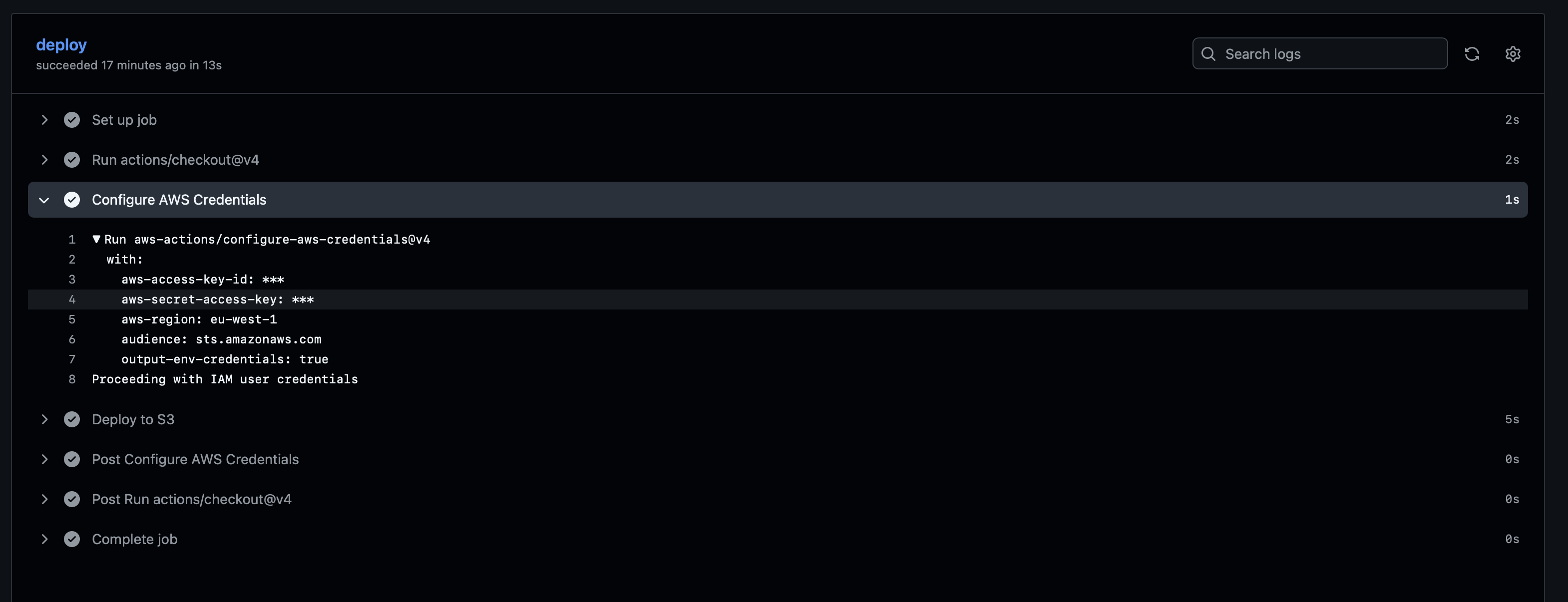
But OIDC is definitely on the menu for future improvements to avoid any potential risks with static keys.
Phase 3: Moving to Hugo + Blowfish#
Manually editing index.html is not sustainable if I want to write articles. After some research (hey grok) I chose:
- Hugo — extremely fast static site generator
- Blowfish — modern, clean, and highly customizable theme
Installation was straightforward (sudo port install hugo on macOS), and after a short learning curve I migrated the whole site to Markdown. (ugh it looks so ugly at first, but it’s just a matter of getting used to it)
Now publishing a new article is as simple as:
Write in Markdown git add . git commit -m “Add new article” git push
…and GitHub Actions does the rest … well it worked with single file, why it shouldn’t work with multiple files, right?
To be done later#
- Well, I really hate there’s no TLS/SSL - I guess I can add CloudFront in front of S3 (static website using S3 can’t do SSL natively) and get free TLS certs from AWS Certificate Manager, right?
- I created many things manually, this needs to be terraformed all the way around - at least the S3 bucket and the DNS record, right? (what about git repository, the IAM role , the github action … )
- The built of the website ( hugo build ) should be part of the github action, not something I do locally and then push the generated files to git - that’s just wrong, right?
- Can Github Actions do OIDC to get temporary AWS credentials instead of using static keys? I guess it can, but I need to learn how to do it - that’s definitely on the menu for future improvements.
Conclusion#
This was a fun and educational project to get my website up and running. It’s not perfect, but it’s a start — and it’s fully automated with GitOps principles. And most importantly, it’s a platform to share my knowledge and experience with the world, and hopefully attract some interesting projects along the way. So stay tuned for more articles about AWS, Terraform, GitOps, and all things cloud networking!
Git repo#
and as some people would say - show me your code - here you are: https://github.com/lrozehnal/mplexia.com
Lessons Learned#
- Going independent is harder than I expected.
- A strong public portfolio really matters.
- Once you taste proper GitOps automation, you never want to go back to manual work.
- Hugo + Blowfish seems like an excellent combo for technical blogs.