Introduction#
Yesterday, I referenced http://www.dest-unreach.org/socat/doc/socat.html#EXAMPLES
with examples and one of those is actually a multicast!
If you remember, a network connection (TCP or UDP) is like a phone call, well, IP multicast is like TV Broadcast - a single source sent the data (stream of bytes) and others consume it (or not if not interested). IP multicast is well known for being fairly difficult to set up (and troubleshoot) but with socat, it is actually quite easy to do. Do you remember that almost-no-sense example with ssh over UDP? Here we go again!
Scenario#
Imagine following scenario - the box s1 on the left hand side is the source of the multicast (multicast is technically an unidirectional stream of UDP packets to ‘whoever is interested’) and the box s2 is the consumer of the multicast. The source s1 sends the stream of bytes to the multicast group and s2 ‘somewhat announced’ to the network that it’s interested in the multicast group and then consumes the stream of bytes. Boxes s3 and s4 are also interested but the ‘I want to listen too’ announcement doesn’t work due to lack of multicast support between s1, and s3 and s4.
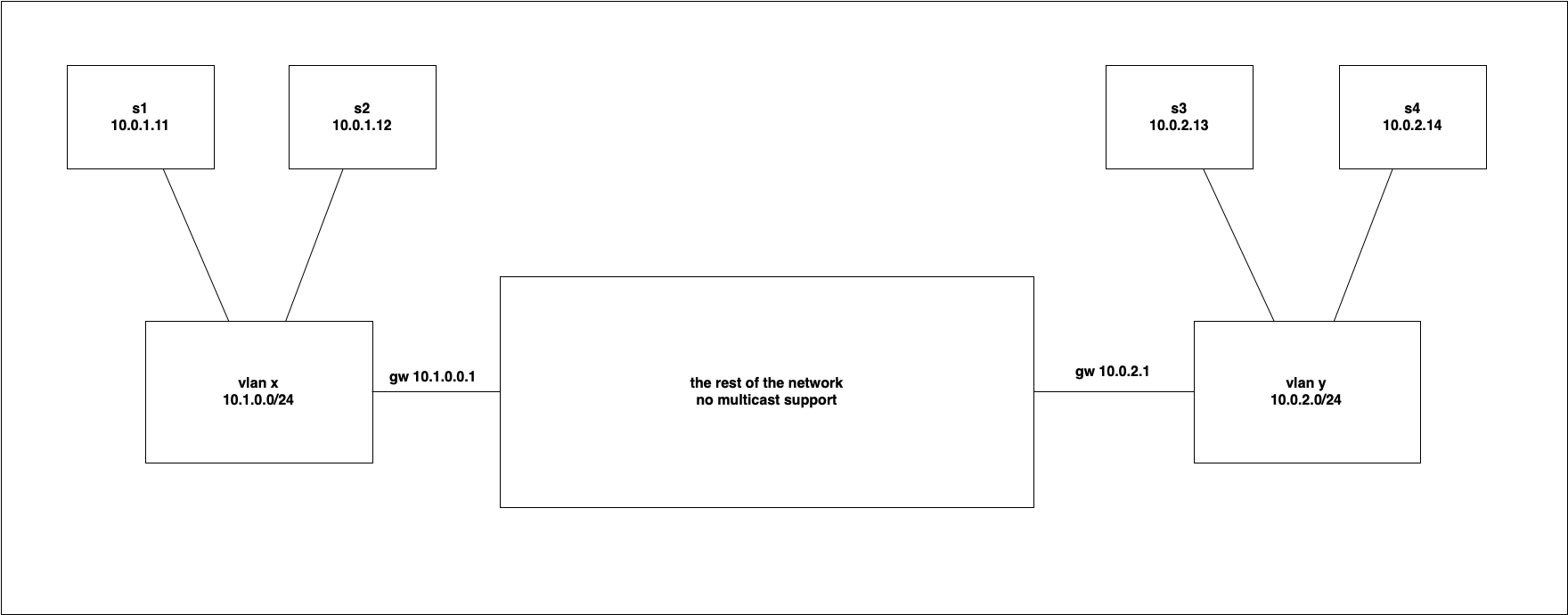
Let’s demonstrate:
on s1
socat -u - UDP4-DATAGRAM:224.1.2.3:12345,range=10.0.0.0/8on s2
socat -u UDP4-RECVFROM:12345,ip-add-membership=224.1.2.3:10.0.1.12,fork -on s3
socat -u UDP4-RECVFROM:12345,ip-add-membership=224.1.2.3:10.0.2.13,fork -on s4
socat -u UDP4-RECVFROM:12345,ip-add-membership=224.1.2.3:10.0.2.14,fork -And sent a message from s1:
[lab@s1 ~]$  socat -u -  UDP4-DATAGRAM:224.1.2.3:12345,range=10.0.0.0/8
Good evening!
the message is received on s2:
[lab@s2 ~]$ socat UDP4-RECVFROM:12345,ip-add-membership=224.1.2.3:10.0.1.12,fork  -
Good evening!
but not on s3 nor s4
[lab@s3 ~]$ socat UDP4-RECVFROM:12345,ip-add-membership=224.1.2.3:10.0.2.13,fork -

[lab@s4 ~]$ socat UDP4-RECVFROM:12345,ip-add-membership=224.1.2.3:10.0.2.14,fork -
So what now? do we need to implement underlay/overlay network? Setup some GRE somewhat somewhere and route it through it? Or do we need to buy an expensive appliance? Do we need to bypass all firewalls? Well… let me repurpose some of our servers in the scenario - I want server s2 to work like a proxy - on one side, it will listen for the incoming multicast and on the other it will sent the exact byte stream into direct UDP connection over the part of network which doesn’t support multicast. On the other side, s3 will listen for inbound UDP traffic from s2, and all byte stream will be broadcasted sent as multicast so server s4 can consume it (as multicast).
(I am going to change the used addresses and ports to make everything working as intended)
and let’s demonstrate it again: on s1
socat -u - UDP4-DATAGRAM:224.1.2.3:12345,range=10.0.0.0/8on s2
socat UDP4-RECVFROM:12345,ip-add-membership=224.1.2.3:10.0.1.12,fork UDP:10.0.2.13:23456on s3
socat UDP-L:23456,fork UDP4-DATAGRAM:224.1.2.4:34567,range=10.0.0.0/8on s4
socat UDP4-RECVFROM:34567,ip-add-membership=224.1.2.4:10.0.2.14,fork -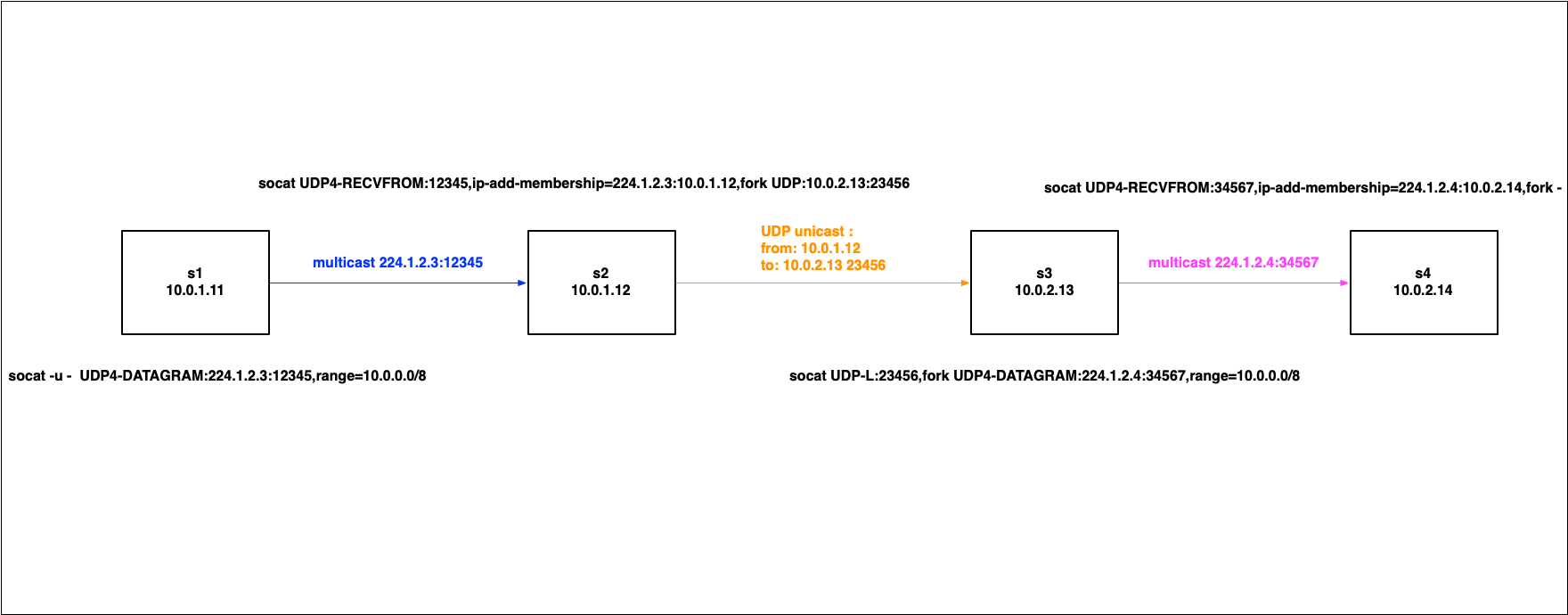
Quick test: on s1
[lab@s1 ~]$  socat -u -  UDP4-DATAGRAM:224.1.2.3:12345,range=10.0.0.0/8
Good morning!!
and received on s4
[lab@s4 ~]$ socat UDP4-RECVFROM:34567,ip-add-membership=224.1.2.4:10.0.2.14,fork -
Good morning!!
Technically, s1 act as the ‘broadcaster which is usually out of our control’, and s4 on the other side is just a ‘dummy’ application which is out of our control as well, but s2 and s3 are ‘under our control’ and we can use them to ‘bridge’ the multicast stream between s1 and s4. Isn’t it cool?